The Look In Filter
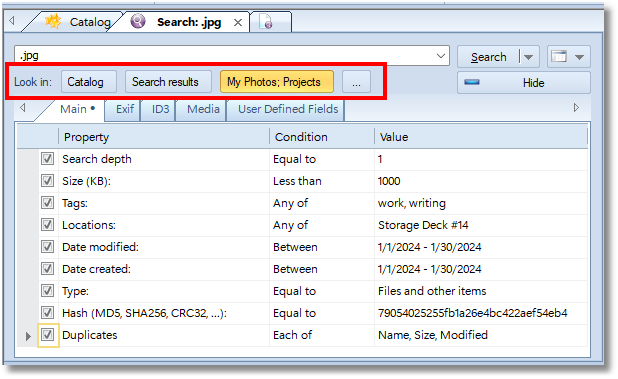
The “Look In” filter consists of three fields:

Catalog - perform the search within entire catalog file. The entire search scope is selected by default when you open a new search tab.

Search results - search within search results from the previous search. This option is hidden on a new search tab and appears after the first search ends.

The selected location (“My Projects” on the screenshot below) - limit the search scope by the selected catalog folder. When you open a new search tab by clicking the New Search Here context menu entry, the selected folder is set as the search scope by default.

[…] - click the ellipsis button to select another folder to look in. Using the ellipsis button, you can select several folders to search in (CTRL+Click for multi-select).

Show or hide the additional options panel.