Hello, we’re glad to announce that a new version of WinCatalog has been released. The version number is 2024.7 This update includes several enhancements, bug fixes and a new experimental feature. Below is a summary of the changes in this release:
WinCatalog Discography
Thanks to your feedback, WinCatalog now allows you to add audio CDs (and other types of media) without needing to insert them into a drive. Simply enter the artist’s name, the release title, or the barcode, perform an online search, and save all the details in your catalog. This feature is currently experimental and only supports MusicBrainz.org as the data source, but we plan to expand support to include other data sources in the future.
How It Works:
 Additional Steps for Artist Searches: If multiple artists match your query, WinCatalog will ask you to select the correct one.
Each release may have several media associated with it. By selecting a release on the left, you can see the different media and tracks. Click “Add” to place the disc in the Basket for later addition to the catalog. Then, click “Save” or “Save & Close” to add the contents of the Basket to your catalog.
Additional Steps for Artist Searches: If multiple artists match your query, WinCatalog will ask you to select the correct one.
Each release may have several media associated with it. By selecting a release on the left, you can see the different media and tracks. Click “Add” to place the disc in the Basket for later addition to the catalog. Then, click “Save” or “Save & Close” to add the contents of the Basket to your catalog.
Check the screenshot of a search example for “take five” (without quotes). Click on the image to see it in the full resolution.
For more details on the new feature, refer to the user manual here.
Ohter changes
Thumbnail Preview Pane Updates: You now have the option to choose whether you want to stretch images to fill the entire preview pane or display them as is. Additionally, you can copy images to the clipboard. Both options are available through the context menu of the Thumbnail Preview Pane.
When manually adding thumbnails (remember, you can add thumbnails to any item in WinCatalog), you can now choose whether to resize the added image or keep it in its original size.
Bug Fixes and Improvements:
Download
To download WinCatalog 2024.7 please click here. You do not need to uninstall a previous version of WinCatalog. Just install the latest version over the existing one.
Posted on: May 15, 2024
Hello, a new maintenance update of WinCatalog was just released. It fixes the issue when WinCatalog crashes on an attempt to change volume details via the Volume Info tab of item properties.
Download
To download WinCatalog 2024.6.2 please click here. You do not need to uninstall a previous version of WinCatalog. Just install the latest version over the existing one.
Posted on: February 5, 2024
Hello, we’re glad to announce that a new version of WinCatalog has been released. The version number is 2024.6.1 This update includes several enhancements and bug fixes to improve your experience with our software. Below is a summary of the changes in this release:
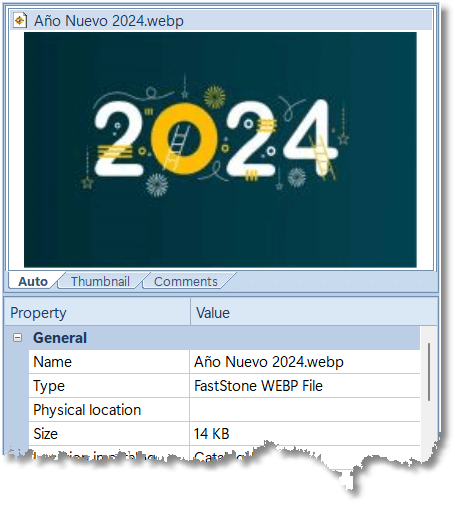 Thumbnail Display Enhancement: Thumbnails now fill the preview pane for a more visually appealing and informative display.
Search by Hashes and Checksums: Enhanced search capabilities to include hashes and checksums (MD5, SHA256, Blake2, CRC32), making it easier to locate files based on their unique identifiers. Leave the search field blank or type the asterisk (means find all files and folders), them mark the Hashes row on the Main tab of the additional search options, paste the HASH value and hit Search. WinCatalog will find all files matching the criteria. Please note, the calculation of the hashes should be turned on. You can find this option in the Checksums and Hashes section of the General Scanning tab individually for each scanning profile. Please also read the following section in the user manual after changing the processing options: Skip Unmodified Files During Updating a Drive.
Search Tab Options: the New Search Tab command behavior changed in concern of the “Look In” filter. The entire catalog search scope is set by default for the “Look In” filter with the ability to reduce the search scope to the selected folder just in one mouse click. The “New search here” context menu option now accurately limits the search scope to the selected folder.
Context Menu Enhancements: We’ve added a “New search here” menu entry for empty spaces within the interface, and fixed the behavior of the the “New search here” command as it did not function as expected and limited the search scope by the parent folder instead of the selected one.
The Open In Catalog Command: now behave consistently in the search results and in the main UI. Previously the Open In Catalog command executed from search results opened the parent folder instead of the intended folder.
Search History and Folder Selection: Increased the number of entries in the Search History combo, which is set to 20, but can now be configured via the registry. Also, updated the software to not move down to the selected folder after the update process ends, streamlining the update experience.
Editable Volume Info Tab: Some fields on the Volume Info tab are now editable, offering more flexibility in managing volume information directly within the interface.
Search Field Focus: Fixed an issue where the search field would lose focus when switching between WinCatalog and other applications using ALT+TAB.
Interface Adjustments for High DPI: We’ve fixed an issue where the backstage Catalog page and program options did not fit the screen properly on large scaling factors, enhancing visibility and usability on high-resolution displays.
The version 2024.6.1 fixes the issue with stretching square thumbnails.
Download
To download WinCatalog 2024.6.1 please click here. You do not need to uninstall a previous version of WinCatalog. Just install the latest version over the existing one.
Posted on: February 2, 2024
Hello, we’re glad to announce that a new version of WinCatalog has been released. The version number is 2024.5. The highlight of this update is the revamped MediaInfo processing module. It’s now capable of extracting embedded thumbnails from video files, providing Titles for streams, and uncovering detailed information about chapters and other media elements.
Alongside the MediaInfo module upgrade, we’ve implemented numerous minor fixes and improvements for smoother operation and enhanced reliability.
Download
To download WinCatalog 2024.5 please click here. You do not need to uninstall a previous version of WinCatalog. Just install the latest version over the existing one.
Posted on: December 28, 2023
 Hello, we’re glad to announce that a new version of WinCatalog has been released. The version number is 2024.4. In this release, we focused on new features, stability, and improvements.
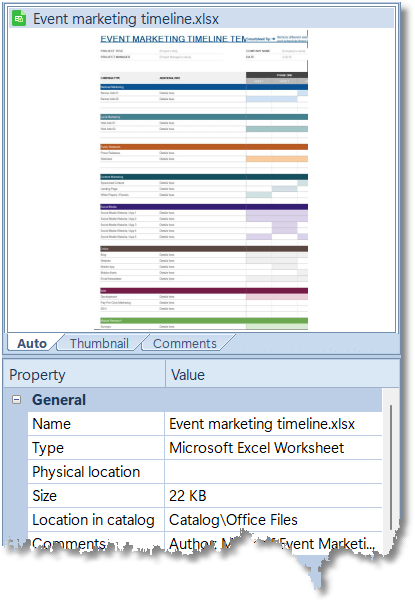
The main new feature of the update is the ability to grab text and thumbnails from Office Document Files (Word, Excel, PowerPoint, OpenOffice, Markdown) in the same way WinCatalog did before for PDF files. This capability transforms how users interact with their digital archives, making content within these files searchable and easily identifiable.
The feature works seamlessly, indexing the content of each document as it is added to the catalog. Users can quickly search for specific phrases, keywords, or data within their extensive collection of Office files. This level of content accessibility is particularly useful for professionals and students who deal with large volumes of documents, enabling them to locate the required information without the need to open and manually search each file. Additionally, the generated thumbnail previews provide a visual representation of each document, making it easier to identify files at a glance.
The option to process files is turned on by default for the Full File Info scanning profile and is limited to grabbing the first 2,000 characters. The thumbnail size is set to 1080x1080 for readability. Find the Office Files section to change these settings.
The MediaInfo engine was rewritten and now works faster, the processing of audio files was switched to the new engine as well. In addition to that, WinCatalog now adds Bit Depth and Codec Info to the list of fields grabbed for Audio files. The ‘Various Artists’ label for multiple artists per composition is now separated when creating and assigning Tags.
In addition to that, the latest version contains a lot of smaller improvements and bug fixes. For example, now if you rename a file, WinCatalog automatically selects the file name base (i.e. without extension) in the editing field. Fixed the issue when WinCatalog crashed on an attempt to search using the Tags row only (when no other search options were selected). When thumbnail generation for images was turned off, WinCatalog didn’t get picture resolution for images not having Exif tags, now it detects dimensions by itself. When adding an archive via the Add File command, an extra entry with the archive name was created. Now WinCatalog creates no unnecessary entries.
WinCatalog now uses the associated scanning profile to identify the thumbnail size, when you assign or update the image via the Thumbnail tab of the Properties window. The Options button overrides this value for the selected entry or for non-file items (virtual folders, custom items - they don’t have a scanning profile associated).
A bunch of smaller improvements.
Download
To download WinCatalog 2024.4 please click here. You do not need to uninstall a previous version of WinCatalog. Just install the latest version over the existing one.
Posted on: November 21, 2023
Hello, a new version of WinCatalog 2024.3.4 was released. This is a maintenance update fixing the issue when WinCatalog crashed on starting with Search Panel (this feature allows automatically open a new search tab on startup). The update also fixes the issue when File Eplorer Tags extraction interrupted by a timeout caused the inability to grab tags from other files.
Spanish (Latin America) translation was updated.
Download
To download WinCatalog 2024.3.4 please click here. You do not need to uninstall a previous version of WinCatalog. Just install the latest version over the existing one.
Posted on: October 23, 2023
Hello, a new version of WinCatalog 2024.3.3 was just released. This is a maintenance update fixing the new diacritics-insensitive search not working properly in Windows 7 and in earlier versions of Windows 10. This issue has not been seen in later versions of Windows 10 (since version 20H1) and all versions of Windows 11. If you are a Windows 7 or Windows 10 (19H2 or earlier) user, the update may be critical.
This update also improves the WinCatalog’s behavior when renaming items. The Rename command now selects the file name without extension. For folders and files without extension, the whole name is selected.
Turkish translation was updated.
Download
To download WinCatalog 2024.3.3 please click here. You do not need to uninstall a previous version of WinCatalog. Just install the latest version over the existing one.
Posted on: October 21, 2023
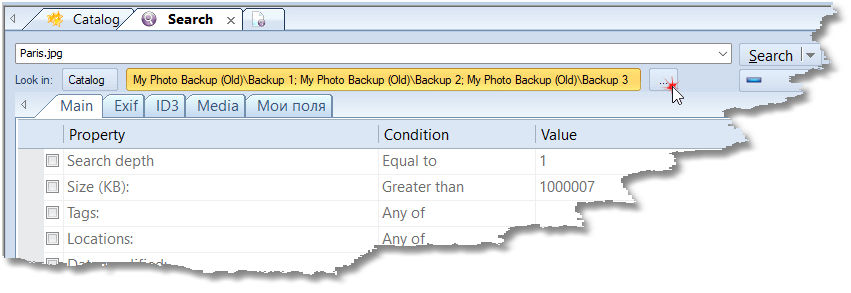
Hello, we’re glad to announce that a new update of WinCatalog 2024.3.2 has just been released. This is a maintenance update adding the ability to select more than one catalog folder for the Look In filter when searching. To select more than one folder for the Look In filter, hold down the CTRL key and click the mouse for multiple selections.
This update also fixes an issue where some processing modules were incorrectly handling individual files added via the Add File command.
If the image does not contain Exif tags, in previous versions WinCatalog did not import the resolution. Now an Exif entry is created inside the catalog file and the resolution is saved.
In addition to that, WinCatalog now uses individual settings for remembering the last directory with Catalog Files, another one for Reports, and the third one for files added via the Add File command, and for thumbnails (the Thumbnail tab). This ensures that the open file dialog will always open in the previous folder, depending on the command being executed.
Another improvement concerns the command line interface. The command line argument parser has become more reliable. Previously, command line options had to start with a short dash (minus sign), slash, or colon. However, there were frequent errors when minus signs were replaced by long dashes, and command line arguments were no longer correctly interpreted by WinCatalog. Now WinCatalog perceives practically any dash as a correct beginning for an argument.
Several translations were updated.
Upgrading to WinCatalog 2024
WinCatalog 2024 is available as a free upgrade to everyone who purchased a license to WinCatalog 2024, or WinCatalog 2023 (meaning a full 2023 version, not an upgrade from a previous version), or a Lifetime Major Upgrades option, or the upgrade to WinCatalog 2023 within the last 6 months from the release date (starting from February 1st, 2023).
Others can purchase an upgrade to WinCatalog 2024 at a special upgrade price with a 50% discount. To check your upgrade status or renew a registration key if needed, please click here.
Download
To download WinCatalog 2024.3.2 please click here. You do not need to uninstall a previous version of WinCatalog. Just install the latest version over the existing one.
Posted on: October 18, 2023
 As the calendar page turns, we find ourselves celebrating WinCatalog’s 22nd birthday!
In the last 22 years, we’ve had multiple releases, but even more are coming to bring our software to the cutting edge, and the primary reason for all the changes is you - our loyal customers.
From day one, our focus has been on making software that is not just powerful but also user-friendly. Your emails, reviews, and testimonials have been crucial for our continuous improvement. In return, we’ve always aimed to provide impeccable customer service and prompt updates.
Your support and trust have been invaluable to us. From constructive reviews to positive testimonials, you’ve helped shape WinCatalog into what it is today.
As we look forward, expect more innovative features and the same commitment to customer service you’ve come to know.
Thank you for an incredible 22 years. Here’s to many more!
Best wishes, the WinCatalog Team
Posted on: October 12, 2023
Hello, we’re glad to announce that the a new version of WinCatalog was just released. The version number is 2024.3. We’ve listened your feedback and implemented some exciting new features and improvements.
New Feature: Reading File Tags from File Explorer
The new feature lets you read file tags from the Details tab of File Properties in File Explorer. If the file type supports additional information, WinCatalog will read it! Keywords and rating are imported as tags (and the original rating value is stored internally for future usage), and comments are added to the Comment field. For hierarchical tags saved by, for example, Adobe Bridge (they are separated by vertical bars) can be separated.
This option is turned on by default for the Full File Info scanning profile, WinCatalog will grab File Explorer tags for new and modified files. If you want WinCatalog to add tags for files that have already been added to the catalog and have not been modified, temporarily disable the “While updating a disk or a folder: skip unmodified files (speeds up the update process)” option. It is located on the General Scanning tab for each scanning profile. Don’t forget to enable the option after updating the drives in order to speed up future updates.
Display the Total Number of Files and Folders
Ever wondered how many files and folders are nested inside a particular folder? Wonder no more! WinCatalog 2024.3 can now display the total number of files and folders (and also drives, virtual folders and custom items) within each folder, providing you with a snapshot overview of your storage situation. You can find these number on the General tab of item properties. It works for drives, folders, archives.
This feature not only allows you to find out the number of files, but also to compare this data with what is displayed by a file manager such as File Explorer. That is why WinCatalog uses two counting methods for archives: if you select an archive and look at its properties, the General tab will display the number of files and folders inside the archive. However, if you select multiple files and folders (or look at the properties of the parent folder or disk), the entire archive will be counted as a single file. This is done so that the number of files and folders displayed by WinCatalog corresponds to the number displayed by File Explorer.
Show or Hide the Advanced Search Options Pane
Now you can hide the Advanced Search Options pane to save vertical space for search results in case you don’t need it. The Look In filter is always visible, but the additional tabs can be collapsed.
Paste or Drag Thumbnails to Thumbnail tab
To quickly assign a thumbnail to any entry in WinCatalog, you can now open the Thumbnail tab of the item properties, and paste the thumbnail from the Cliboard, or drag a picture from the System.
Permanent Tag Order
The string representation of associated tags is now sorted alphabetically, so these values always look the same in reports or in the WinCatalog interface.
Minor Bug Fixes and Improvements
As always, we’ve ironed out some minor bugs and made performance improvements to ensure that WinCatalog runs smoothly.
Upgrading to WinCatalog 2024
WinCatalog 2024 is available as a free upgrade to everyone who purchased a license to WinCatalog 2024, or WinCatalog 2023 (meaning a full 2023 version, not an upgrade from a previous version), or a Lifetime Major Upgrades option, or the upgrade to WinCatalog 2023 within the last 6 months from the release date (starting from February 1st, 2023).
Others can purchase an upgrade to WinCatalog 2024 at a special upgrade price with a 50% discount. To check your upgrade status or renew a registration key if needed, please click here.
Download
To download WinCatalog 2024.3 please click here. You do not need to uninstall a previous version of WinCatalog. Just install the latest version over the existing one.
Posted on: October 5, 2023

