 Hello, we’re glad to announce WinCatalog 2026.2. This is a big update for our disk catalog software: a 5-star rating system, custom columns you build yourself, a completely new keyboard shortcut engine, and a full move to 64-bit. There’s also a long list of speed and stability work under the hood.
If you organize a large media or backup collection, a few of these are worth the upgrade on their own. Here’s what changed.
5-Star Ratings
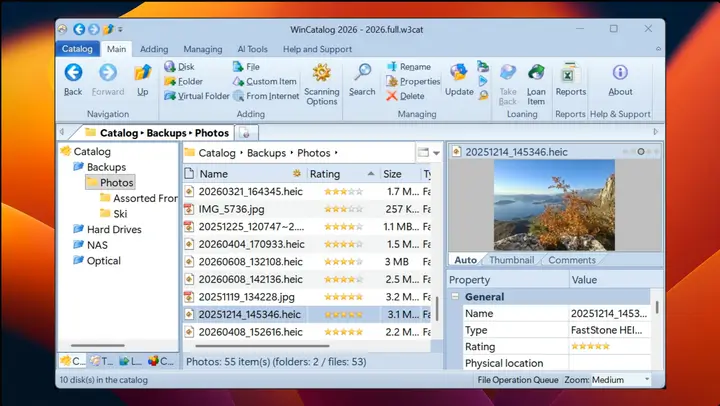
You can now rate any item from 1 to 5 stars and sort your collection by quality or preference. Rating works the way you’d expect from a good file organizer:
Dynamic Columns (Custom Token-Based Columns)
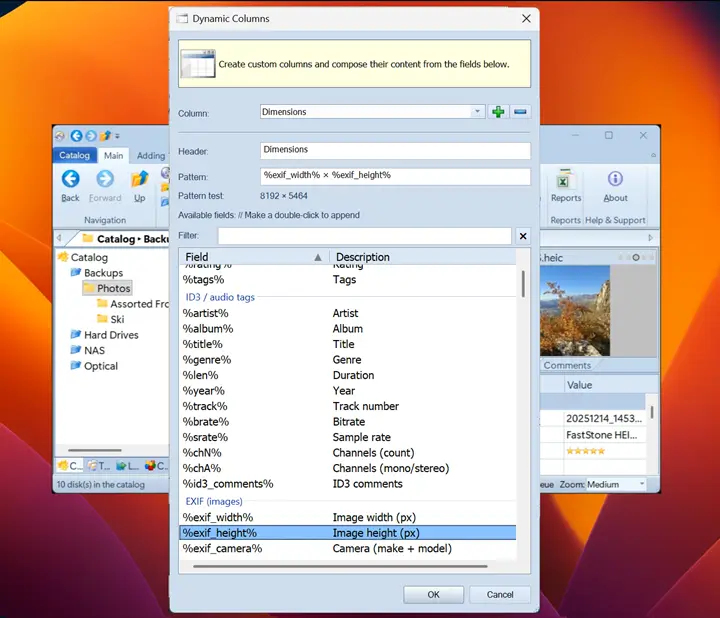
This one is for people who want their catalog to look exactly the way they think. You can build your own columns out of metadata tokens, defined per collection. Mix and match tokens (including %tags% and the new %db_id%), rename them live, and they respect localization. If the built-in columns never quite matched your workflow, now you can make ones that do.
A New Keyboard Shortcut System
We replaced the old shortcut engine with a new one and gave it a proper settings page. You can assign shortcuts, filter them by category, and search by command name to find the one you want instead of scrolling a long table. Your existing custom shortcuts from older versions are imported automatically on upgrade.
Thumbnail Background Color
You can now pick a custom background color for thumbnail previews. This makes a real difference for transparent PNGs, logos, vector graphics, and product images that used to disappear against the default background. The color applies across the thumbnail list view too, with smooth hover animations.
WinCatalog Is Now 64-bit
WinCatalog 2026.2 ships exclusively as a 64-bit (x64) application. For most people this is invisible and just means more headroom for very large catalogs:
Faster, and Lighter on Disk
A lot of this release went into speed. The improvements you’re most likely to notice on a big collection:
Display and Thumbnail Fixes
Scanning and AI Bridge
Smarter Re-scan for Missing Thumbnails
When you re-scan a folder, WinCatalog can fill in items that are missing a thumbnail without redoing the whole job. Until now that automatic re-scan only covered pictures and archives. It now also picks up media files, comics, ebooks, Office documents, PDFs, 3D models, RAW photos, fonts, and EXE icons, along with archives and disk images that came in with no children. So if you added support for a new file type by upgrading, a quick re-scan brings the existing entries up to date instead of forcing a full rebuild.
Smaller Things Worth Mentioning
Upgrading to WinCatalog 2026
WinCatalog 2026 is a free upgrade for everyone who purchased a full license to WinCatalog 2024 (not an upgrade from a previous version), or a Lifetime Major Upgrades option, or the upgrade to WinCatalog 2024 within the last 6 months from the release date (starting from October 1st, 2025). For those who have a valid license for the 2026 version, version 2026.2 is available as a free minor upgrade.
Others can purchase an upgrade at a special price with a 50% discount. To check your upgrade status or renew a registration key, please click here.
Download
To download WinCatalog 2026.2 please click here. You do not need to uninstall a previous version of WinCatalog. Just install the latest version over the existing one.
If you’re not yet a WinCatalog user, try the free trial and see how it works as a disk catalog and file organizer for your own collection.
Posted on: June 29, 2026

