 Hello, we’re glad to announce a new major update, WinCatalog 2026. The version number is 2026.1.
This release adds AI-powered image analysis, support for several new file types, and improvements based on user feedback.
AI-powered image descriptions with AI Bridge
WinCatalog 2026 introduces AI Bridge, a companion tool that uses a local AI model running on your computer to analyze image thumbnails already stored in your catalog. For each image, AI Bridge generates a short caption describing the scene, a set of keywords, a category label, and a shot type (close-up, medium shot, etc.).
All of this gets saved in the catalog database and is searchable immediately. Type “dog on beach” or “birthday party” and find matching images even if none of those words appear in the file names or EXIF tags.
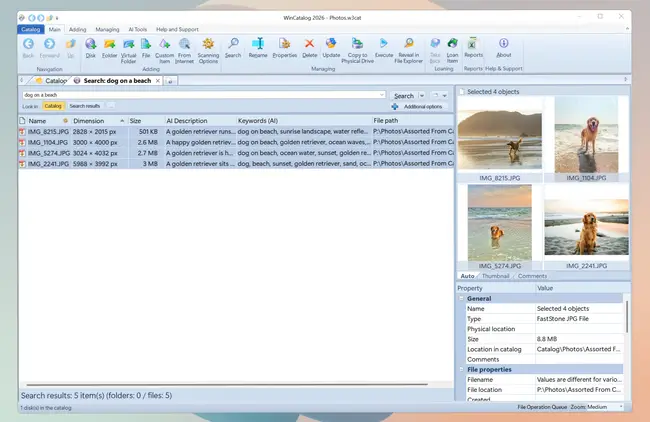
AI Bridge works with LM Studio and Ollama, and handles images (JPEG, PNG, TIFF, BMP, RAW) and video files that have generated thumbnails.
Because everything runs locally, no images or data leave your computer. And since the AI models are open-source and downloaded once, there are no subscription fees or per-image costs.
eComic scanning
WinCatalog 2026 can now scan comic book archives in CBZ, CBR, and CB7 formats. The scanner reads Comic Info metadata embedded inside these archives, pulling out title, series, author, and other comic-specific details. If you have a digital comics collection, you can now catalog and search it like any other file type.
Font files with preview thumbnails
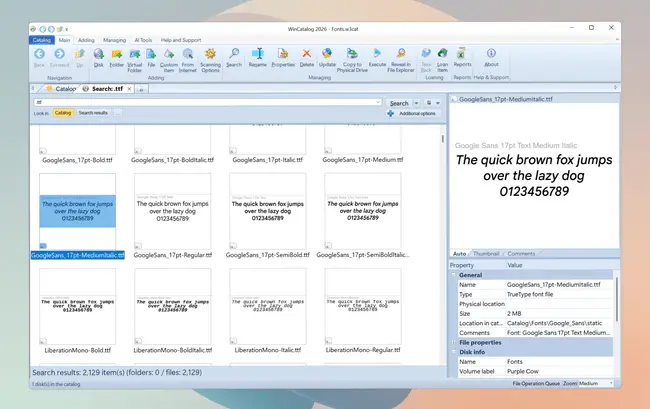
For every TTF or OTF file in your catalog, WinCatalog 2026 now renders a preview thumbnail that displays the font name together with a configurable phrase (the standard “The quick brown fox jumps over the lazy dog 0123456789” pangram phrase is pre-defined) in the typeface itself. If you keep hundreds or thousands of fonts on disk, you can finally browse them by eye in the standard WinCatalog grid view instead of opening each file separately.
Disk image scanning
You can now scan inside disk image files in ISO, VHD, VMDK, VDI, and WIM formats without mounting them first. Whether it’s installation media, virtual machine snapshots, or system backups, WinCatalog reads the file structure inside the image and adds it to your catalog.
3D model support
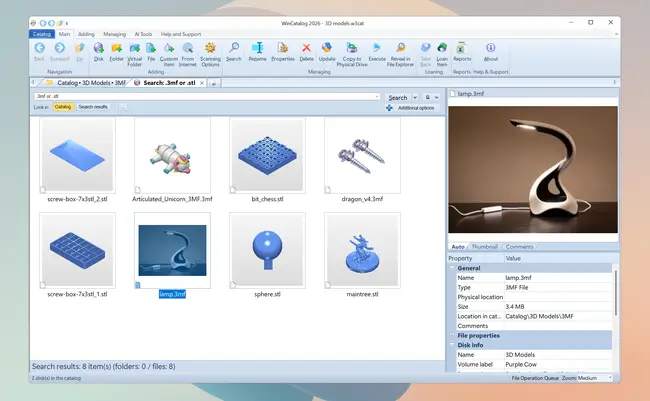
WinCatalog 2026 can scan STL and 3MF model files and generate thumbnail previews for each one, so you can visually browse your 3D assets at a glance.
Metadata panel improvements
We renamed the Multimedia tab in the Properties panel to Metadata. It now shows more information, including comic book metadata for eComic files and AI-generated descriptions. A new description.ion parser reads folder and file comments from readme files, so those become searchable in your catalog too.
Better post-scan reporting
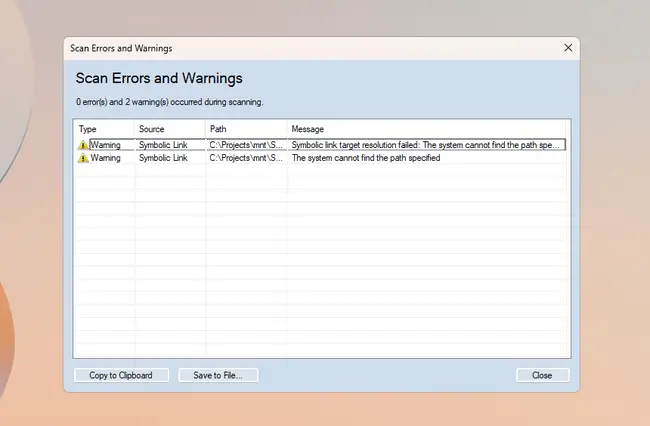
We redesigned the error and warning dialog that appears after scanning. You can now sort the results, copy them to clipboard, save to file, and resize the dialog, which makes it easier to work through issues from a scan.
Scanning profile management
You can mark any profile as the default with a star toggle, so your preferred configuration is always one click away. Profile renaming updates immediately across the interface. Useful if you maintain profiles for different media types or storage locations.
Other improvements
This release includes smaller fixes and tweaks based on user feedback. EXE icon extraction during scanning is now configurable. Background maintenance of the external search index is more stable. Other performance and stability fixes are included as well.
Upgrading to WinCatalog 2026
WinCatalog 2026 is a free upgrade for everyone who purchased a full license to WinCatalog 2024 (not an upgrade from a previous version), or a Lifetime Major Upgrades option, or the upgrade to WinCatalog 2024 within the last 6 months from the release date (starting from October 1st, 2025).
Others can purchase an upgrade at a special price with a 50% discount. To check your upgrade status or renew a registration key, please click here.
Download
To download WinCatalog 2026.1 please click here. You do not need to uninstall a previous version of WinCatalog. Just install the latest version over the existing one.
Posted on: April 15, 2026

