Hello, we’re glad to announce that a new update of WinCatalog was just released. The version number is 2024.2.
Diacritic-insensitive (or accent-insensitive) search
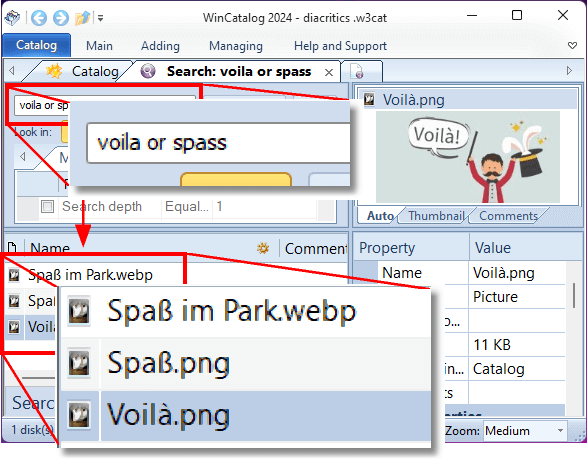 The latest update introduces an exciting and highly anticipated feature: diacritic-insensitive search.
This new functionality empowers users with a more efficient way to locate their files and folders within the cataloged data.
Diacritics, those unique marks and symbols that embellish letters in various languages, often present challenges when searching for specific items.
With the diacritic-insensitive search, users can bid farewell to the frustration of meticulously accounting for these nuances, as WinCatalog now ensures that such distinctions no longer impede the search process.
This enhancement brings a significant level of convenience to users who frequently deal with diverse languages or variations in text representations.
Whether it’s finding files with accented characters, umlauts, or other diacritics, WinCatalog’s new feature offers a seamless experience.
Users can now enter their search queries without having to consider these linguistic subtleties, allowing for a more natural and fluid interaction with the software.
Please note: after the new update is installed, WinCatalog will automatically recreate fast search idex, which may take a few minutes.
Thumbnails or Comments or Auto - The Properties Pane was Enchased
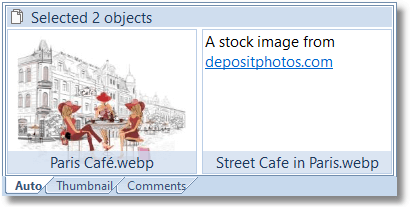 In the new version of WinCatalog, the Properties pane receives a significant enhancement that promises a more personalized and informative experience for users. With the introduction of the option to display comments instead of thumbnails, users gain greater control over how they interact with their cataloged files. This update offers improved flexibility when browsing through cataloged items.
A standout feature of the pane is the adaptation based on the presence of thumbnails. In cases where a thumbnail for a particular file is unavailable, WinCatalog automatically displays comments to ensure that users can glean valuable insights about the file.
For users who desire a more customized view, WinCatalog empowers them to explicitly choose between displaying comments or thumbnails in the Properties panel.
By the way, the Comments field is powered by the link highlighting and the ability to copy text to the Clipboard.
Relative Paths - A new Experimental Feature
Introducing a groundbreaking addition to its feature set, WinCatalog now offers users the ability to add drives, folders, and files using relative paths. This new capability expands the way users manage and organize their cataloged data, simplifying the process and enhancing the software’s flexibility.
The concept of relative paths takes data organization to a new level of convenience. With this feature, users can now add files and folders to their catalog using paths that are defined in relation to the catalog’s current location.
The power of relative paths becomes particularly evident when, for example, you want to burn files to an optical media (or copy to a portable storage deivce) together with the catalog file.
The ability to define paths in relation to the catalog’s location ensures that WinCatalog keeps relations with files after moving to a new structure. This feature also simplifies the migration of catalogs between devices, as the paths remain adaptable to different environments without requiring manual adjustments.
Please note that relative paths work only inside the same drive (at least in Windows). Please also note that this feature was released as experimental and needs to be turned on explicitly in the Program’s options.
Watch the video explaining the new feature:
Duplicate Finding Bug was Fixed
A bug that had been causing unexpected search results during duplicate searches: files being erroneously identified as duplicates of themselves during the second and subsequent searches. The root cause of this issue was identified as a side effect of the newly introduced “search in search results” feature.
The “search in search results” feature was introduced in WinCatalog 2024.1 to enhance users' ability to refine their searches by allowing them to perform additional searches within the results of a previous search.
Upgrading to WinCatalog 2024
WinCatalog 2024.2 is available as a free upgrade to everyone who purchased a license to WinCatalog 2024, or WinCatalog 2023 (meaning a full 2023 version, not an upgrade from a previous version), or a Lifetime Major Upgrades option, or the upgrade to WinCatalog 2023 within the last 6 months from the release date (starting from February 1st, 2023).
Others can purchase an upgrade to WinCatalog 2024 at a special upgrade price with a 50% discount. To check your upgrade status or renew a registration key if needed, please click here.
Download
To download WinCatalog 2024.1 please click here. You do not need to uninstall a previous version of WinCatalog. Just install the latest version over the existing one.
Posted on: August 28, 2023
 Hello, we’re glad to announce that a new major update of WinCatalog 2024 was released. The version number is 2024.1.
The new version introduces an array of advanced search options, customization features, and optimizations. Let’s delve into the exciting new additions that make WinCatalog 2024 a must-have tool for anyone seeking efficient and streamlined catalog management.
Precision Search with Advanced Filtering
WinCatalog 2024 takes search capabilities to a whole new level by offering advanced search options that delve into specific attributes extracted from various file types. Whether you’re searching for a photo captured by a certain camera or at a particular day, or a song with a certain artist, or a video with a French audio and English subtitles, the ability to search by Exif tags for photos, ID3 tags for audio files, and video attributes adds a whole new dimension to file search.
Find more about the Additional Search Options in the User Manual here.
Visual Categorization with Custom Icons
In a bid to enhance visual organization, WinCatalog 2024 introduces custom icons for catalog entries. With a repository of over 250 icons, users can assign individual icons to entries, creating a unique and intuitive visual categorization system. This feature adds a touch of personalization and streamlines the identification of files at a glance.
Efficient Tag Management with Keyboard Shortcuts
Tagging your files for easy categorization is a powerful technique, and WinCatalog 2024 makes it even more convenient with the introduction of a keyboard-driven tag management system. The revamped Tags page in the Properties window divides tags into three sections, ensuring easy access and organization. The live filtering box combined with keyboard shortcuts simplifies tasks like adding, assigning, unassigning, or renaming tags. These enhancements are bound to delight users who heavily rely on tags for their file organization strategy.
Find more about this feature in the User Manual here.
Multi-Page Browsable HTML Reports
Sharing catalog information with colleagues, friends, or collaborators has never been easier. WinCatalog 2024 introduces a new report type - multi-page browsable HTML reports. This feature allows users to generate HTML copies of their catalog files, enabling easy sharing and publication. Under the hood, the new reports engine empowers users to generate reports of any size, across all supported report types, including XML, CSV, HTML, and multi-page HTML reports.
Refined User Experience and Performance Optimizations
As always, user feedback plays a pivotal role in shaping software improvements. WinCatalog 2024 is no exception, as it incorporates numerous smaller enhancements and performance optimizations based on user input. These refinements ensure a smoother and more efficient experience, making WinCatalog an even more indispensable tool for organizing your digital world.
Embrace the Future of Digital Organization with WinCatalog 2024
As the digital landscape continues to evolve, the need for efficient file management becomes increasingly crucial. WinCatalog 2024 responds to this need with its advanced search options, customizable categorization, streamlined tag management, and powerful report generation capabilities. Whether you’re a professional managing extensive assets or an individual aiming for a clutter-free digital life, WinCatalog 2024 offers the tools you need to succeed.
Don’t let digital disarray hold you back. Embrace the power of WinCatalog 2024 and take control of your digital universe today. Experience the future of organization and efficiency like never before. Say goodbye to file-finding frustrations and hello to an organized future that’s designed entirely around you.
Upgrading to WinCatalog 2024
WinCatalog 2024 is available as a free upgrade to everyone who purchased a license to WinCatalog 2023 (meaning a full 2023 version, not an upgrade from a previous version), or a Lifetime Major Upgrades option, or the upgrade to WinCatalog 2023 within the last 6 months from the release date (starting from February 1st, 2023).
Others can purchase an upgrade to WinCatalog 2024 at a special upgrade price with a 50% discount. To check your upgrade status or renew a registration key if needed, please click here.
Download
To download WinCatalog 2024.1 please click here. You do not need to uninstall a previous version of WinCatalog. Just install the latest version over the existing one.
Posted on: August 8, 2023
 Hello, we’re glad to announce that a new version of WinCatalog was released. The version number is 2023.4.1.
The new version adds the ability to include files and folders to scanning by mask. This feature is completely opposite to already existing “exclude files and folders from scanning by mask” and allows to reduce the number of files in the catalog, for example, to create catalogs of certain types of files, say, PDF files only, or photos, or music files, and so on. This feature is complemented by the ability to not add empty folders to the directory. Both features are turned off by default, you can find them on the File Processing tab and configure individually for each scanning profile.
Content-based thumbnails for folders. If a folder contains “cover.jpg”, “cover.png”, “folder.jpg”, or “folder.png” images, one of these thumbnails will be uses as the folder thumnbail. If the folder contains no of these files, the first thumbnail will be picked for the folder.
When adding a drive or a folder, WinCatalog now checks if the drive or the folder already exists in the catalog and suggests updating the existing entry instead of adding a new copy. The new feature helps to avoid occasionely duplicated entries in the catalog.
Some people want to check stats and numbers after the process ends. The new ability to keep the scanning progress window open after finishing the scanning process will help.
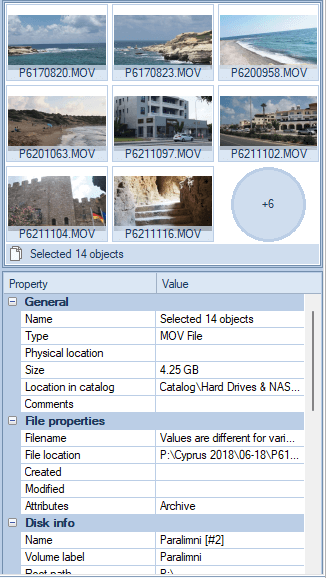
The thumbnail preview pane now displays up to 9 thumbnails for the selection.
The process of grabbing thumbnails for video files is now more robust and changes the thumbnail extraction method after reaching a timeout (if any).
The Copy To Physical Drive operation for several entries now uses a bulk copy operation. The new addition allows clicking “do the same for the X next conflicts” in the standard Windows copy dialog and continue.
New experimental feature - IPTC tags extraction. Now WinCatalog can grab IPTC tags from photos and store them as Comments. In addition to that, it creates tags based on IPTC keywords. The “Extract Exif, IPTC tags from digital photographs” option should be turned on.
Download
To download WinCatalog 2023.4.1 please click here. You do not need to uninstall a previous version of WinCatalog. Just install the latest version over the existing one.
Posted on: May 12, 2023
Hello, a new version of WinCatalog was publicly released. The version number is 2023.2.5.
The search logic has been adjusted. The main part was reverted to how it worked in the 2021.1 version, but the new search operator indicated the search term should be stricly located in the end of filenames or words was added ($ sign, as in regular expressions).
Now the simple search query “.xls” (without quotes) finds “report.xls” and “report.xls.zip”. To exclude the second entry from the search results, add the $ sign to the extension. The search query “.xls$” (without quotes) finds “report.xls” but it doesn’t find the “reoprt.xls.zip” because the “.xls” part in the filename isn’t in the end.
The $-sign operator works only when located in the end of the search query. If located in the middle, WinCatalog treats is as a normal character. If you want to search for files having extentions that ends by $, echo the operator: “.mp$” will find files having the “.mp$” extension.
In addition to quotation marks, round and square brackets, and the backslash itself, you can now echo all other word delimiters in search queries as well. The list of word delimiters include hashtag, uderscore, dash, exclamation and question marks, dot, equal sign, semicolon, colon, and others.
Download
To download WinCatalog 2023.2.5 please click here. You do not need to uninstall a previous version of WinCatalog. Just install the latest version over the existing one.
Posted on: March 16, 2023
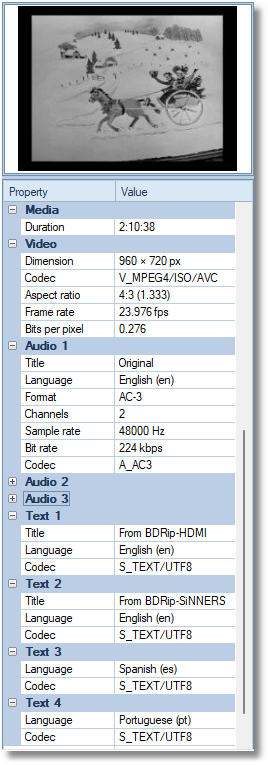 Hello, we’re glad to inform you that a new version of WinCatalog has been released. The version number is 2023.2. The new version is now able to grab the subtitle information from video files (text streams), and title tag from audio streams (on the screenshot). The new update also fixes the problem when the video codec information wasn’t grabbed. The search logic has been adjusted (details below).
The search logic has been adjusted. As before, WinCatalog splits search phrases into terms, but if a search term starts with a dot, it is treated as a file extension and should be located at the end of the filename.
For example, if you search for “movie.mp4” (without quotes), the search phrase is split into two parts: “movie” and “.mp4” (with the leading dot). The search query literally means: find all files with any word in the filename starting with “movie” and ending with “.mp4”. So WinCatalog will find “Cool Movie.mp4”, “My_Movie.mp4” and “Movie About Us.mp4”, but it will not find “Cool Movie.mp4.srt” (because the file extension is .srt, not .mp4).
To include the last filename in the search results, add the asterisk after the extension, so the results for the search phrase “movie.mp4*” (without quotes) include all of the filenames listed above.
Another addition to the search logic is the ability to escape brackets and quotes with the backslash character. Square brackets and double quotes are two variations of the exact match operator, and round brackets are used to combine expressions. An unquoted backslash allows these characters to be included in the search phrase not as search operators, but as characters.
For example, the search phrase “document(*)” (without quotes) finds all files that contain the word “document” and any text in the parentheses: “document(1).docx”, “document(2023).docx”. The file “document 2023.docx” will not be found because the fielname doesn’t contain parentheses.
The backslash echoes only double quotes, round and square brackets, and the backslash itself (to echo the backslash, say, before brakets, use another backslash: “Archive\(Books)"). If the backslash is used before any other character, it is also interpreted as a normal character.
Download
To download WinCatalog 2023.2 please click here. You do not need to uninstall a previous version of WinCatalog. Just install the latest version over the existing one.
Posted on: February 7, 2023
 Hello, we’re glad to announce that the new version of WinCatalog was released. The version number is 2023.1.
The new version can now grab text from PDF files having the text layer and make it searchable just like it did for text files. The thumbnails of first pages are here as well.
Good news for photographers: WinCatalog now contains a new processing module for RAW files and can process RAW files (CR2/CR3, DNG, NEF, ORF, and other types) much faster than previously.
The ability to limit the number of thumbnails per folder was added to all types of files having thumbnails.
The new version contains other minor improvements and bug fixes.
Upgrade
This is an intermediate upgrade. The upgrade to WinCatalog 2023 is free for everyone who has a valid license for WinCatalog 2021, WinCatalog 2020, or purchased a Lifetime Major Upgrades option in addition to the main license.
If you purchased a license for WinCatalog 2019 (meaning the full license, not the upgrade from a previous version) you’re eligible to upgrade to WinCatalog 2020/2021 for free, therefore the 2023 version is free for you as well.
If you are a registered user of any version prior to WinCatalog 2019, you can purchase an upgrade to WinCatalog 2023 at a special upgrade price. Please click here for details.
Download
To download WinCatalog 2023.1 please click here. You do not need to uninstall a previous version of WinCatalog. Just install the latest version over the existing one.
Posted on: December 22, 2022

This week we celebrate WinCatalog’s 21st birthday. The age of majority for humans, but not for the software. We have a lot of plans for future updates, including a total UI redesign, adding new features, extending and improving existing ones.
But now it is time to light candles on a birthday cake and say thank you to all of you for your support and feedback! For a lot of features, you suggested during these years, for your comments and suggested improvements!
And, finally, Happy Birthday, WinCatalog!
Posted on: October 12, 2022
Hello, a new update for WinCatalog was released on August 9, 2022, the version number is 2021.5.1. The update fixes a critical issue when WinCatalog grabbed, but didn’t display media information for video files. We apologize for the inconvenience.
In addition to the fix WinCatalog now removes unnecessary whitespace from text fields when grabbing Exif tags, and grabs GPS coordinates (Latitude, Longitude, and Altitude) from photos (if available).
Spanish (Latin America) translation was actualized.
Download
To download WinCatalog 2021.5.1 as a full package please click here. You do not need to uninstall a previous version of WinCatalog. Just install the latest version over the existing one.
If you have already downloaded and installed WinCatalog 2021.5, you may download just the reduced package containing only the modified binaries (8 MB). WinCatalog 2021.5 is required to be installed previously: → download the update.
Posted on: August 9, 2022
Hello, we’re glad to announce that the new version of WinCatalog was just released. The version number is 2021.5.
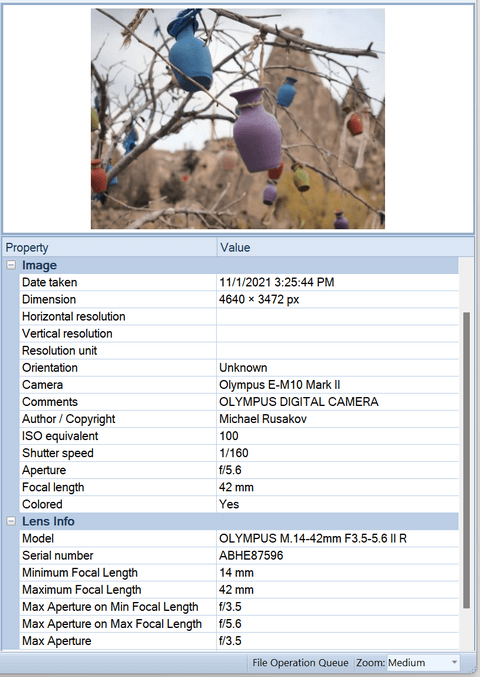
WinCatalog can now grab Lens information from photos. However, WinCatalog still can’t search using this information it can only display it. The next version (WinCatalog 2023) will have the ability to search using any field, including lens info.
Some of the processing modules in WinCatalog (when processing PDF files, archives except ZIP files, and ISO files) need to create temporary files during the scanning process. By default, WinCatalog uses the system TEMP folder as a location for these files. Now you can specify a custom folder for temporary files by your choice. You can find this option on the General Scanning page individually for each scanning profile. By default, WinCatalog continues using the system TEMP folder.
The ability to limit the number of thumbnails and cover images per folder was added. Sometimes it is needed to have just several thumbnails from an image folder, especially, if the folder contains similar images or sequential shots. This option helps to reduce the catalog file size. The limit may be set individually for pictures, RAW files, thumbnails generated from video files, and cover images grabbed from ID3 tags of audio files. All limits are turned off by default, you can find the mentioned options on the File Processing tab individually for each scanning profile.
The next new feature is the ability not to follow symbolic links. Symbolic links work like shortcuts to folders and can be used, for example, to have the same folder in different places in the file system (the folder may be located on another drive or a different computer in the local network).
Previously, WinCatalog cataloged these folders as normal folders, which caused duplicating files (once when processing the original folder, and second when processing the same folder via symbolic link). Now WinCatalog can process these folders just once, however for compatibility with previous versions (in order to have the same behavior as in the previous version), the option is turned off by default.
The size of the symbolic links is set to 0, this excludes cases when having one or more symbolic links increases the total size of the data stored on the drive.
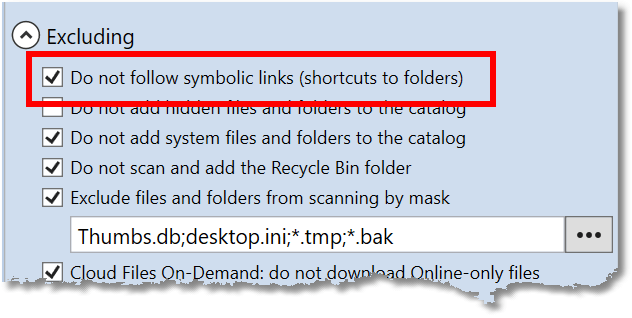
You can find the option to exclude symbolic links from the scanning process in the Excluding section of the General Scanning tab. As with all other scanning options, it should be set individually for each scanning profile.
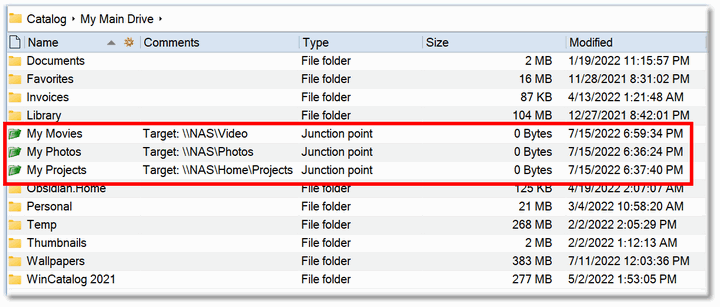
WinCatalog displays symbolic links using the green folder icon and always shows the Target (where the folder is actually located) in comments:
The option not to follow symbolic links is on the General Scanning page of a scanning profile:
The update contains other minor improvements and fixes.
Download
To download WinCatalog 2021.5 please click here. You do not need to uninstall a previous version of WinCatalog. Just install the latest version over the existing one.
Posted on: August 8, 2022
Hello, we’re glad to announce that the new version of WinCatalog was just released. The version number is 2021.4
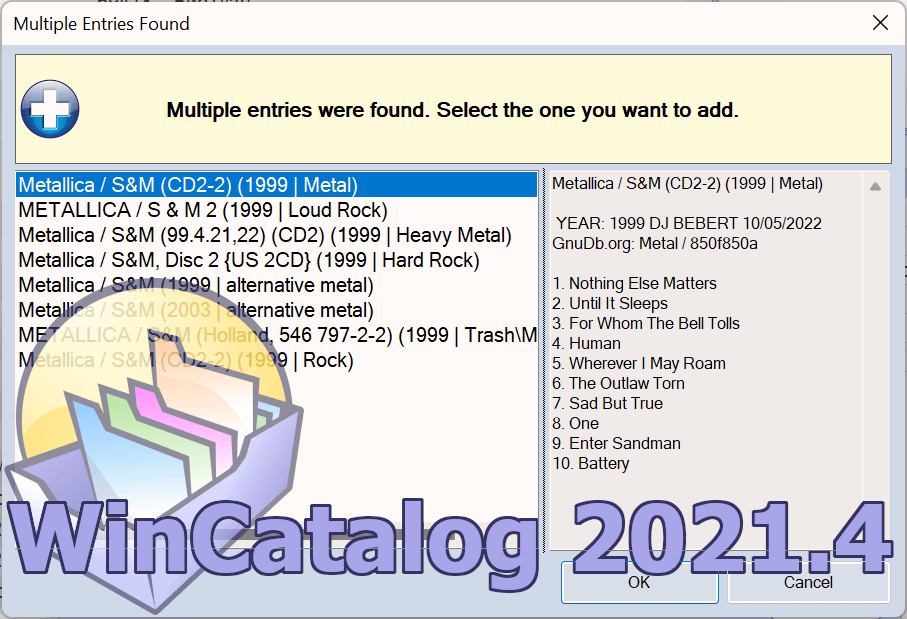
The update adds a new data source for Audio CDs: in addition to MusicBraiz.org, GnuDb.org is now available (unfortunately, without album covers, because GnuDb.org doesn’t have them but with the ability to select from several results if multiple entries are found in the database). Now you can select one out of three options: MusicBrainz.org, then GnuDb.org if found nothing in MusicBrainz. This option is the default out of the box. Two other options restrict WinCatalog to use MucicBrainz.org only, or GnuDb.org only.
A bug was fixed when it wasn’t possible to save scanning profiles imported from .json files.
The “end of the scanning process” sound was returned back (but turned off by default). This option was removed in the 2021.1 version based on feedback, but after making the changes, we started to receive requests to add it back. So, now this option was added back and includes now four different sounds: a Tibetian Gong, two melodies, and the classic Ta-Da sound. Of course, the option isn’t limited by these four sounds, and you can use other sounds you have.
Korean translation was actualized.
Download
To download WinCatalog 2021.4 please click here. You do not need to uninstall a previous version of WinCatalog. Just install the latest version over the existing one.
Posted on: July 8, 2022

