 We are glad to announce that a new maintenance update of WinCatalog 2009 has been just released. The version number is 2.88.
Now WinCatalog 2009 can add several files to the catalog simultaneously by using Add File command…
Posted on: September 25, 2009
“By the way – fantastic program. I had used WinCatalog Light years ago. Now bought copies of Pro for myself and my wife for work and pleasure. Having cataloged old drives I have been able to easily find things I had long forgotten.”
John Blackmore
Posted on: September 17, 2009
We are glad to announce that a new maintenance update of WinCatalog 2009 has been just released. The version number is 2.87.
Now WinCatalog 2009 can calculate MD5 and CRC32 checksums for archives in addition to regular files.
Posted on: September 17, 2009
 We are glad to announce that a new version of WinCatalog 2009 has been just released. The new version can now calculate CRC32 checksum for files (in additional to MD5 checksum from an earlier version).
The option to calculate the CRC32 is switched off by default. To enable it, please run WinCatalog 2009, click Tools menu item, then click Program’s Options and follow to the Scanning tab to mark the correspondent checkbox. It is also possible to exclude small files from CRC32 calculation.
The CRC32 calculation works faster than the MD5 calculation; however it still slows down the scanning process.
The other improvement of the new release is MP3 file scanning enhancement. Now WinCatalog 2009 correctly works with MP3 files with broken or invalid ID3 tags.
Posted on: July 17, 2009
 A new version of WinCatalog 2009 is released. The compatibility issue with some versions of Windows XP is fixed.
While adding new items to the catalog the previous version of WinCatalog 2009 (2.84) could not load a new mp3 scanning plugin (mp3Info2.dll) on some Windows XP installations. The new version 2.85 fixes this issue.
The upgrade is strongly recommended for all users who run WinCatalog 2009 version 2.84 under Windows XP.
Posted on: June 20, 2009
 We are glad to announce that a new version of WinCatalog 2009 has been just released.
There are two significant improvements in the new version: in mp3 files scanning and in Audio track names retrieving.
ID3 is a very popular audio file data tagging format in active use by software and hardware developers around the world. ID3 tags are supported in software such as iTunes, Windows Media Player, Winamp. ID3 tags contain information about Song Title, Artist, Genre etc.
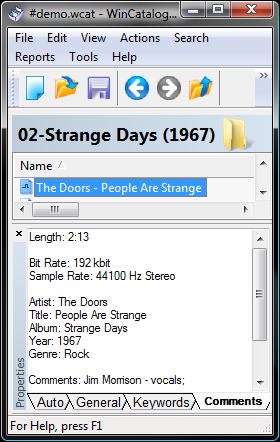
While adding an mp3 file to the catalog, WinCatalog 2009 extracts ID3 tags and changes the display name for the file by using “Artist – Song Title” template. WinCatalog 2009 also creates a keyword with Artist name and links the keyword with the added mp3 file. This will help you to navigate your files in the future.
The ID3 tags summary is placed into the comments field for the mp3 file just like it’s shown on the screenshot.
Since version 2.84 WinCatalog 2009 can retrieve Audio track names from several online sources simultaneously. This new improved feature finds almost 100% Audio tracks over the Internet.
If WinCatalog did not find any tracks for your audio disks in the past, you definitely should give it another try to do this.
Posted on: June 18, 2009
“This is exactly what I was looking for. I can’t describe how perfect you’ve made this. I’ll try anyway: recently I’ve had a concept in my mind for a file archive catalog desktop software program for some time now. I even created a document to help plan out the concept. My intention has been to eventually make the solid so strong, that I could comfortably outsource the programming & development.
That won’t be necessary! I think I’ll save thousands of dollars on software development and pay for a license with you guys. Great job, couldn’t have done it better myself!”
Derrick Schwabe
Posted on: June 8, 2009
“WinCatalog helps me to manage both documents and favorites (the two principal sources of knowledge in my computer) and I can add both tags (that let me organize documents and favorites for arguments so that if I need all the documents related with “constructivism” I can find all the documents in my pc and at the same time all the links to the web) and comments usefull if I need not all the documents related to an argument (that can be too much) but a single document that I annotated in the past and that I cannot remember the name.”
Gianni Stival
Posted on: June 7, 2009
“Excellent software! Thank you for sticking to conventional look & feel as much as possible - it makes the program very intuitive to use. Also, the nested virtual folders alone are worth the money - no one else seems to understand or implement this feature correctly.”
James Lohman
Posted on: June 7, 2009
 Is your file collection out of control? **Do you waste hours searching dozens of disks for the files you need? **
Let WinCatalog do the work! WinCatalog makes it easy to find your documents, programs, images, music, and other data—whether they’re on CD, DVD, Flash Cards, Memory Sticks, Zip Disks, or other removable media. WinCatalog remembers where you store everything and lets you find it in seconds.
Try WinCatalog for free and see how easy it is to take control of your information!
Posted on: June 7, 2009

